

Welcome to  -
Marg ERP AI+
-
Marg ERP AI+
Home > Margerp > Sale Order > How to Enable Batch window in Sale and Purchase Order in Marg ERP Software ?
How to Enable Batch window in Sale and Purchase Order in Marg ERP Software ?

Ans.1
- Go to Masters > Marg Setups > Control Room.

- The user will select 'Search in All' option.

- The user will search 'Quotation' and click on the 'Accept' button.

- In 'Batch/Size/MRP wise Y-All Order Q-Quotataion S-S.Order q-S&Q B-Both', the user will select 'Y'.
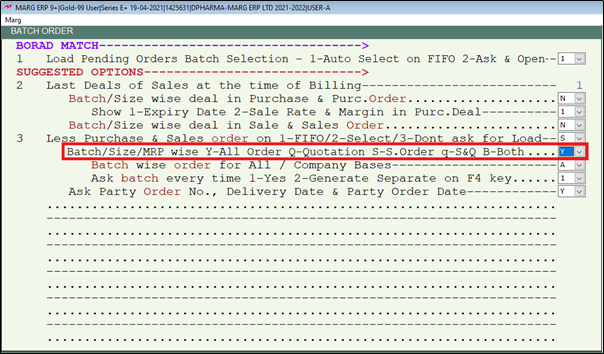
- Press 'Esc' key.

- Click on 'Yes' button.

After following the above steps, the Batch window will get enabled in Sale and Purchase order in Marg ERP Software.


In This Page









